
Download Summarizer Tool – AI Text Summarizer, Fast & Secure
Overview
The Summarizer Tool is an AI‑powered web application built to turn long‑form content into bite‑size summaries in seconds. By leveraging advanced natural‑language processing algorithms, the tool identifies the core ideas of a document and rewrites them in a format that matches the user’s preferred tone—whether that’s professional, friendly, or even sarcastic. Users can feed the application raw text, upload plain‑text files, or paste content directly into the editor, eliminating the tedious copy‑paste routine that plagues many traditional summarizers.
Once the summary is generated, it can be copied to the clipboard with a single click or downloaded as a JSON file for downstream processing, making the Summarizer Tool a handy companion for writers, students, researchers, and anyone who needs to extract key information quickly. While the platform currently focuses on English‑only input and processes one document at a time, its intuitive UI, secure cloud processing, and real‑time output make it a compelling choice for anyone looking to boost productivity and improve reading efficiency. The tool is completely web‑based, which means there’s no need for installation, and it works on any modern browser, offering a seamless experience across Windows, macOS, Linux, Android, and iOS devices.
Key Features & Capabilities
- AI‑driven summarization that condenses lengthy texts into concise paragraphs or bullet points.
- Three tone options: professional, friendly, and sarcastic, allowing the summary to match the desired voice.
- Multiple output formats: plain paragraph, bullet‑point list, or downloadable JSON file.
- One‑click clipboard copying for instant pasting into emails, reports, or note‑taking apps.
- File upload support for .txt documents, removing the need for manual copy‑pasting.
- Responsive web interface that adapts to desktops, tablets, and smartphones.
- Secure HTTPS connection ensuring that uploaded content is encrypted during transmission.
- Real‑time processing with results displayed within seconds for most standard‑length documents.
Pros
- Instant, high‑quality summaries that save time.
- Customizable tone makes the output suitable for diverse audiences.
- No software download required; works directly in the browser.
- Simple UI reduces the learning curve for new users.
- Free to use with optional premium upgrades for higher limits.
Cons
- Limited to English language input; no multilingual support.
- Processes one document at a time; batch summarization is unavailable.
- Advanced formatting (tables, code snippets) may be stripped during processing.
- Free tier imposes a daily character limit.
- Requires an internet connection; offline usage is not possible.
Installation, Usage & Compatibility
The Summarizer Tool is a cloud‑based service, so there is no traditional installation process. To start, simply navigate to the official website using any modern browser (Chrome, Firefox, Edge, Safari, or Opera). The platform automatically detects your operating system and adapts the UI for optimal performance on Windows, macOS, Linux, Android, and iOS devices. Below is a step‑by‑step guide to get the most out of the tool:
- Open the website: Visit summarizertool.example.com and ensure the connection is secure (look for the padlock icon).
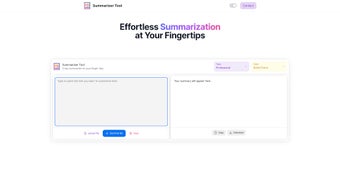
- Select your input method: You can paste text directly into the main text area, or click the “Upload File” button to choose a .txt document from your device.
- Choose the summary format: Toggle between “Paragraph” and “Bullet Points” depending on how you prefer to read the output.
- Set the tone: Pick from “Professional,” “Friendly,” or “Sarcastic.” The AI will adapt its language style accordingly.
- Generate the summary: Click the “Summarize” button. Within a few seconds, the condensed version appears below the input area.
- Copy or download: Use the clipboard icon to copy the summary instantly, or click “Download JSON” to save the result for later integration with other tools.
Because the tool runs entirely in the browser, it is compatible with any device that supports HTML5 and JavaScript, including desktop computers, laptops, tablets, and smartphones. The responsive design ensures that the interface remains intuitive whether you are using a Windows PC, a macOS laptop, an Android phone, or an iPhone.
For users concerned about privacy, the service adheres to a strict data‑retention policy: uploaded texts are processed in memory and are automatically deleted from the server within 30 minutes of completion. This guarantees that sensitive information does not linger on the cloud beyond the immediate summarization task.
FAQ & Conclusion
Is the Summarizer Tool free to use?
Yes, the core summarization features are available at no cost. A premium plan is offered for users who need higher character limits, priority processing, or additional tone options.
Can I summarize documents in languages other than English?
Currently the tool supports only English input. Multilingual support is on the roadmap, but no definitive release date has been announced.
What file formats can I upload?
The uploader accepts plain‑text files with a .txt extension. For other formats (PDF, DOCX), you’ll need to extract the text first or copy‑paste it into the editor.
Is my data safe when I use the Summarizer Tool?
Yes. All communications are encrypted via HTTPS, and the platform deletes uploaded content from its servers within 30 minutes after the summary is generated.
Can I integrate the summarizer with other apps?
The JSON download option makes it easy to feed the summary into automation tools like Zapier, Integromat, or custom scripts. Direct API access is planned for future releases.
In summary, the Summarizer Tool offers a sleek, secure, and AI‑enhanced way to condense large bodies of text without the hassle of manual editing. Its tone‑adjustable output, instant clipboard copying, and cross‑platform accessibility make it a practical ally for students, professionals, and content creators alike. While the lack of multilingual support and batch processing are notable gaps, the free tier already delivers considerable value for everyday summarization needs. If you frequently find yourself skimming articles, drafting reports, or extracting key points from research papers, give the Summarizer Tool a try—simply visit the website, paste your text, and let the AI do the heavy lifting. Boost your productivity, improve comprehension, and keep your workflow streamlined with a tool that’s both fast and secure.
Start summarizing now and experience how AI can transform the way you read and write.



.png)



